 AudioRemover
Data Size Converter
Type a value and pick a unit to see it in every other unit, then estimate the time a transfer needs.
- No upload
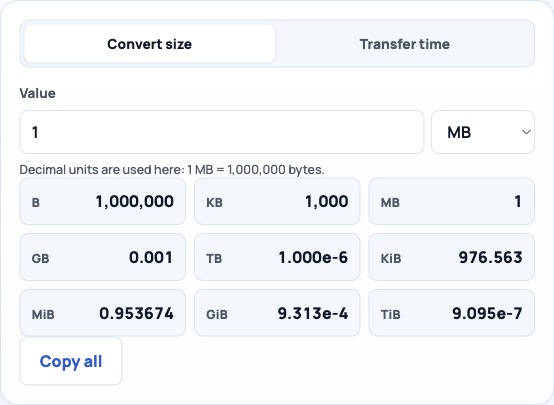
Decimal units are used here: 1 MB = 1,000,000 bytes.
Copied
Estimated time
—
How to use it
- Enter a value and choose the unit it is in.
- Read the same size in decimal and binary units.
- Open the transfer panel to estimate a download or upload time.
Formats and limits
Convert between bytes, KB, MB, GB and their binary equivalents, and estimate how long a download or upload takes at a given speed.
- Processing
- In your browser, no upload
- Output
- B · KB · MB · GB · KiB · MiB · GiB · Mbps
Two systems of units
Decimal units step by a thousand: 1 kB is 1000 bytes, 1 MB is 1000 kB, and so on. Binary units step by 1024: 1 KiB is 1024 bytes, 1 MiB is 1024 KiB. At kilobyte scale the gap is 2.4%, at megabyte scale 4.9%, at gigabyte scale 7.4%, and at terabyte scale about 10%. That is why a capacity can look smaller when reported by an operating system than on the box: the same bytes are divided by a larger unit.
Bits, bytes and connection speeds
A byte is eight bits. Network equipment counts bits because that is what travels over the wire, so an ISP advertises megabits per second while a browser reports megabytes per second. Divide Mbps by 8 to get MB/s, then subtract overhead: 100 Mbps becomes 12.5 MB/s at best and about 11.5 MB/s in practice. A 1 Gbps fibre line is about 125 MB/s, which is fast enough that the remote server or the Wi-Fi link often becomes the limit instead.
Estimating a transfer time
Transfer time is size in bits divided by speed in bits per second. A 4 GB file at 50 Mbps is 32,000,000,000 bits ÷ 50,000,000 = 640 seconds, just under 11 minutes. Real transfers add protocol headers, acknowledgements and congestion control, so a result within 10% of the estimate is normal. Wi-Fi, a busy server, a VPN or a slow disk can each add their own delay; the calculator gives the network floor, not a promise.
Where the missing space goes
A “500 GB” drive shows about 465 GB in Windows because of decimal versus binary units, and a small part is also used by the file system for indexes and metadata. The capacity advertised is the raw decimal number, and no format recovers the difference. The same effect appears in cloud plans: a “2 TB” allowance in decimal units is about 1.82 TiB, which matters when a backup tool reports binary sizes.
Sizes of media files
A minute of 1080p video at a typical 8 Mbps is about 60 MB, so an hour is around 3.6 GB. 4K footage at 40 Mbps is about 300 MB per minute and 18 GB per hour. Audio is much smaller: a three-minute MP3 at 192 kbps is about 4.3 MB, and an hour of lossless FLAC can pass 1 GB. These are the numbers behind upload limits and phone storage warnings, and the bitrate calculator can work out a size for a target bitrate and duration.
Data caps and mobile plans
Mobile plans and home broadband caps are quoted in decimal GB, which matches how streaming services report usage. An hour of HD streaming is roughly 1 to 3 GB, while the same hour at standard definition is closer to 0.7 GB. Downloading a 3.6 GB video on a 20 GB plan uses nearly a fifth of the allowance, so it is worth converting the file size before starting a large download over a metered connection.
What the converter does not do
It does not measure your actual connection speed, does not read a file, and does not model protocol overhead separately — the time estimate assumes an ideal link. It also does not convert between bits per second and bytes per second for storage devices, where marketing labels can be equally optimistic. Use it to compare units and plan a transfer, then measure the real thing when accuracy matters.
Common questions
Why does a 1 TB drive show only 931 GB?
Drive makers use decimal units: 1 TB is 1,000,000,000,000 bytes. Windows divides by powers of 1024 but still labels the result GB, so the same capacity appears as about 931 GB. The drive is not missing space; two different units share one name.
Why is my 100 Mbps connection only 12 MB/s?
Network speeds are quoted in bits per second, while file sizes are in bytes: divide by 8. 100 Mbps is 12.5 MB/s before overhead, so a real download usually settles around 11 to 11.8 MB/s. The same conversion applies to uploads and mobile data rates.
Is a kilobyte 1000 or 1024 bytes?
Both have been used. The SI definition is 1000 bytes, while the binary definition of 1024 bytes is now called a kibibyte (KiB). Windows still shows binary units labelled KB, MB and GB, which is why its numbers differ from a network provider’s.
How long does 1 GB take at 100 Mbps?
1 GB is 8,000,000,000 bits. At 100 Mbps that is 80 seconds at full speed; with typical overhead expect about 90 seconds. Doubling the speed halves the time, but server limits and Wi-Fi often prevent a connection from reaching its headline rate.
Does the converter upload anything?
No. It is arithmetic in the page, with no file picker and no network request. The results are computed on your device and disappear when the page is closed.
Do cloud providers use decimal or binary units?
Most cloud storage and hosting plans quote decimal GB and TB, because those numbers look larger. RAM and many operating systems report binary units. When comparing two plans, convert both to the same unit first, or a 4.9% difference per megabyte can hide inside the headline figure.