 AudioRemover
Number Base Converter
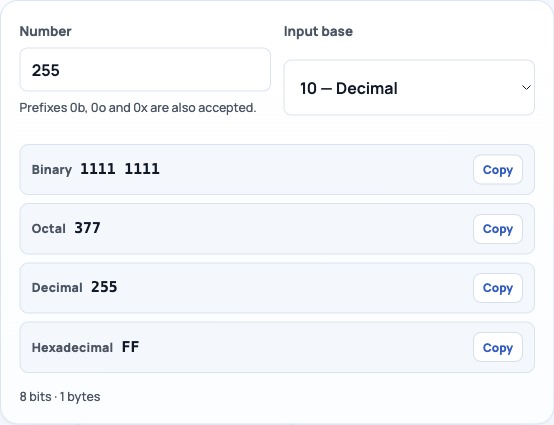
Paste a number in any common base and read the other three at once, with a copy button for each.
- No upload
Prefixes 0b, 0o and 0x are also accepted.
Negative numbers are shown with a minus sign; fixed-width two’s complement is different.
Copied
How to use it
- Choose the base of the number you have.
- Type or paste the digits, with an optional 0b, 0o or 0x prefix.
- Copy the base you need.
Formats and limits
Convert a number between binary, octal, decimal and hexadecimal instantly, with bit length and byte count. Prefixes are accepted.
- Processing
- In your browser, no upload
- Output
- BIN · OCT · DEC · HEX
How positional bases work
Every base writes a number as digits multiplied by powers of the base. Binary 1011 means 1 × 8 + 0 × 4 + 1 × 2 + 1 × 1, which is 11 in decimal. Octal 17 means 1 × 8 + 7 = 15, and hex 1F means 1 × 16 + 15 = 31. The larger the base, the shorter the written number, which is the whole reason hex exists for byte-oriented data.
Hex, nibbles and bytes
A byte holds 256 values, and two hex digits cover exactly that range: 00 to FF. Each hex digit maps to a four-bit nibble, so 0x3A becomes 0011 1010 in binary without any arithmetic. That mapping is why color codes are six hex digits for three bytes of red, green and blue, why file signatures are written as bytes such as 89 50 4E 47, and why hashes and memory addresses are shown in hex. Reading hex fluently means reading bytes fluently.
Where octal still appears
Octal uses digits 0 to 7 and groups three bits per digit. It survives mainly in Unix file permissions, where 0755 means owner read-write-execute, group read-execute and others read-execute. Each octal digit encodes three permission bits, so the notation is compact and directly readable. Outside permissions and a few legacy formats, octal is uncommon, but the converter shows it because pasted values sometimes arrive in that form.
Reading binary quickly
Group binary digits in fours from the right and convert each group to one hex digit: 1101 0110 becomes D6. The nibble table is short: 0000 to 1001 map to 0 to 9, then 1010 to 1111 map to A to F. Leading zeros are padding to reach a byte boundary, not part of the value, which is why 0b00001010 and 0b1010 are both ten. The panel displays binary in groups of four for exactly this reason.
Converting by hand
To go from decimal to another base, divide repeatedly and collect the remainders from last to first: 255 divided by 16 gives 15 remainder 15, so the answer is FF. To go the other way, multiply each digit by its place value and add. The calculator does this with arbitrary precision, which removes the rounding risk of doing it in your head, but knowing the method helps when checking a result or reading code that formats numbers.
Limits and precision
A 32-bit unsigned integer tops out at 4,294,967,295, a 64-bit unsigned integer at 18,446,744,073,709,551,615, and a signed 64-bit integer at half that range on the positive side. JavaScript’s Number stops being exact above 9,007,199,254,740,991, which is why hashes, IDs and file sizes are handled as strings or BigInt. The page works beyond 64 bits, but if the result feeds a program with a fixed-width type, check the range before pasting it in.
Where this shows up in media work
Image editors store each color channel as a byte, so a red value is 0 to 255, or 0x00 to 0xFF. Opacity follows the same range, and PNG signatures, JPEG markers and MP4 box sizes are all byte values that are easier to read in hex. Subtitle and timestamp formats sometimes use hexadecimal counters, and audio metadata can contain numeric IDs in hex. When a color looks wrong or a file header needs checking, converting the value is often the first step.
Common questions
Why do programmers use hexadecimal?
One hex digit is exactly four bits, so two digits make one byte. A value like 0xFF is 255, and web colors such as #FF8800 map directly to three bytes. Hex is shorter than binary and aligns with byte boundaries, which is why memory addresses, color codes and file signatures are written that way.
What do the 0x, 0b and 0o prefixes mean?
They mark the base in many programming languages: 0x for hexadecimal, 0b for binary and 0o for octal. The calculator strips a matching prefix, so pasting 0xFF into the hexadecimal field gives 255. A prefix that does not match the selected base is treated as an ordinary digit and reported as invalid.
How large a number can I convert?
The page uses arbitrary-precision integers, so the digits are not limited by a 32-bit or 64-bit register. In practice most languages and file formats cap unsigned integers at 64 bits, 18,446,744,073,709,551,615. JavaScript numbers are exact only up to 2 to the 53rd, which is another reason hex and BigInt are common in tooling.
How are negative numbers handled?
The result uses a minus sign followed by the magnitude, which is the ordinary signed representation. Fixed-width two’s complement is different: an 8-bit minus one is 0xFF, and a 32-bit minus one is 0xFFFFFFFF. The page notes when the input is negative so the two conventions are not confused.
Can it convert fractions or decimals?
No. It converts whole numbers only. Values with a fractional part, such as 10.5, are rejected because positional fractions need a separate notation and are rarely used in the same contexts as hex byte values.
Is the number sent anywhere?
No. The conversion runs entirely in the page with no network request, so license keys, hashes or any other value you paste stays on your device.