 AudioRemover
Remove silence
Set how quiet counts as silence and how long it must last, then download a tighter copy. The speech itself is never touched.
- MP3 · M4A · AAC · WAV · FLAC · OGG · Opus
- 100 MiB max
- No upload
or drag an audio file here
Free · No sign-up · Processed on your device
How to use it
- Choose an audio file.
- Set the silence threshold and the minimum gap length.
- Download the cleaned audio.
Formats and limits
Delete the quiet stretches from an interview, meeting or dictation — including the lead-in and the tail — in your browser, nothing uploaded.
- Input
- MP3 · M4A · AAC · WAV · FLAC · OGG · Opus
- File limit
- 100 MiB
- Processing
- In your browser, no upload
- Output
- MP3 · M4A · WAV · FLAC · OGG
Processing facts
- No upload — the file stays in your browser.
- 100 MiB · File limit
- Phone transfer files expire after 1 hour.
What counts as silence
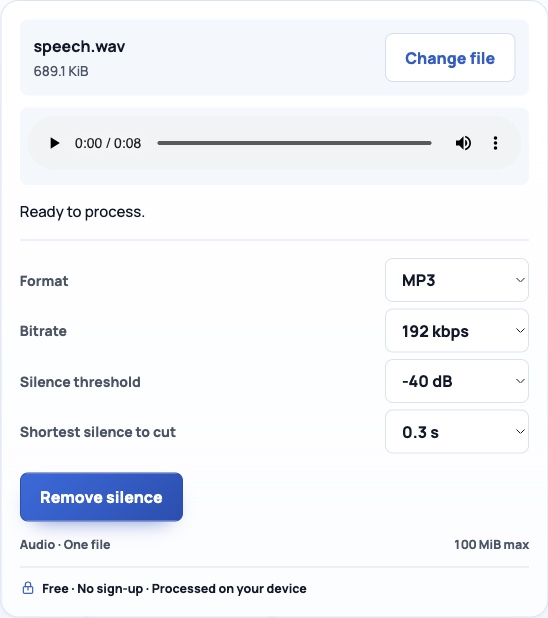
Two settings decide what gets removed. The threshold is the loudness floor: anything quieter counts as silence, anything louder does not. The minimum length is how long a quiet stretch must last before it is cut. A segment disappears only when it stays below the threshold for longer than the minimum, and the rule applies at the start and the end of the file as well as between phrases. Sound that stays above the threshold is never removed, however quiet it may feel in context.
Reading the two settings
The threshold steps are -30 dB, -40 dB and -50 dB. Decibels are logarithmic, so -50 dB is far quieter than -30 dB: -50 removes only stretches that are effectively digital silence, while -30 also classifies faint breaths, room tone and the decay tail of a word as silence. -40 dB is the balanced default. The minimum-length steps — 0.2, 0.3 and 0.5 seconds — protect short pauses; at 0.5 seconds even a deliberate pause between sentences survives the cut.
Where it pays off
Interviews and meetings collect long pauses: someone thinks, a door opens, the recorder keeps running. Screen recordings wait for pages to load, and dictation trails off mid-thought. Cutting those stretches shortens the file and keeps attention on the speech — a forty-minute recording with six minutes of dead air becomes a tighter thirty-four-minute one, with every word in its original order and at its original speed. The words around a removed pause end up next to each other, which takes a moment to get used to and is exactly the point.
Why it is the wrong tool for music
Music is full of quiet passages that are anything but silence: a solo fading to a whisper, a reverb tail, a held breath before a drop. A silence remover sees only loudness, and a threshold loose enough to tidy a podcast will happily eat those passages. Use this tool on speech — interviews, dictation, lectures, meetings, tutorials — and leave music to editors that show every cut before it happens. That is the one place where a cautious threshold matters more than removing more.
What the result sounds like
After removal, neighbouring phrases butt against each other: a speaker who paused for two seconds now sounds like they barely stopped for breath. That is expected and usually an improvement for review listening, but it can feel rushed the first time, and it changes pacing that some recordings rely on. If too much disappeared, the export was written from the untouched original, so raise the threshold to -50 dB or the minimum length to 0.5 seconds and export again.
Formats, limits and re-encoding
MP3, M4A, AAC, WAV, FLAC, OGG and Opus files are accepted, up to 100 MiB each, and the export is MP3, M4A, WAV, FLAC or OGG. Lossy targets re-encode once, which a single pass from a good source barely shows; WAV and FLAC keep the samples for further editing. Everything runs in the browser — the FFmpeg engine loads from a public CDN when you press the button — and the 100 MiB cap exists because the whole file must fit in memory while it is rewritten.
Tuning by ear
Start with the defaults on a typical stretch of the recording, listen to a minute of the export around a former pause, and change one setting at a time. Removing too much announces itself immediately — a clipped breath, a word that lost its tail, a pause that used to carry meaning — while removing too little only means a missed opportunity. Two or three passes of listening beat any amount of guessing about what -40 dB means in your particular room and microphone.
What it is not
It is not a noise gate: it deletes quiet stretches outright rather than ducking them, and there is no attack or release to tune. It does not remove background noise from speech that is present throughout, does not level volume, and does not repair clipped or damaged audio — those are different jobs with different tools. If a recording hisses between sentences, that hiss sits above the threshold and survives, which is correct: it is not silence.
Common questions
Are my files uploaded to a server?
No. The analysis and the re-encode both run in your browser, and the download is written on your device. Nothing is sent anywhere.
Will it damage my audio?
Only the stretches that fall below the threshold for longer than your minimum length are deleted; everything above the threshold is re-encoded but not altered. Export from the original each time and nothing compounds.
What does the threshold mean?
It is a loudness floor in decibels. -50 dB removes only stretches that are effectively digital silence, -40 dB is the balanced default, and -30 dB also treats faint breaths, room tone and decay tails as silence.
Some quiet speech disappeared — why?
The threshold was too aggressive. -30 dB can eat breaths and the soft tail of a word. Move to -40 dB, or -50 dB if the recording is very quiet, and lengthen the minimum gap to 0.5 seconds.
Which files and sizes are supported?
MP3, M4A, AAC, WAV, FLAC, OGG and Opus files up to 100 MiB each, exported as MP3, M4A, WAV, FLAC or OGG. The whole file has to fit in browser memory while it is rewritten.
Can it remove hiss or background hum?
No. Constant noise sitting above the threshold is not silence, so it survives — which is correct. Removing noise from speech that is present throughout needs a dedicated noise-reduction tool.