 AudioRemover
Remove Metadata from Video
See and remove video metadata such as GPS location, EXIF camera data, camera model, creation time and software version. The streams are copied, not re-encoded.
- MP4 · MOV · WebM · MKV · M4V
- 500 MiB max
- No upload
or drag a video here
Free · No sign-up · Processed on your device
How to use it
- Choose a video from your device.
- Review the metadata found.
- Download the clean copy.
Formats and limits
Remove metadata from a video in your browser. Strip GPS, EXIF, camera and time tags without re-encoding.
- Input
- MP4 · MOV · WebM · MKV · M4V
- File limit
- 500 MiB
- Processing
- In your browser, no upload
- Output
- Same container as the source
Processing facts
- No upload — the file stays in your browser.
- 500 MiB · File limit
- No re-encode — the picture is copied, so it often finishes in seconds.
- Phone transfer files expire after 1 hour.
What the panel found
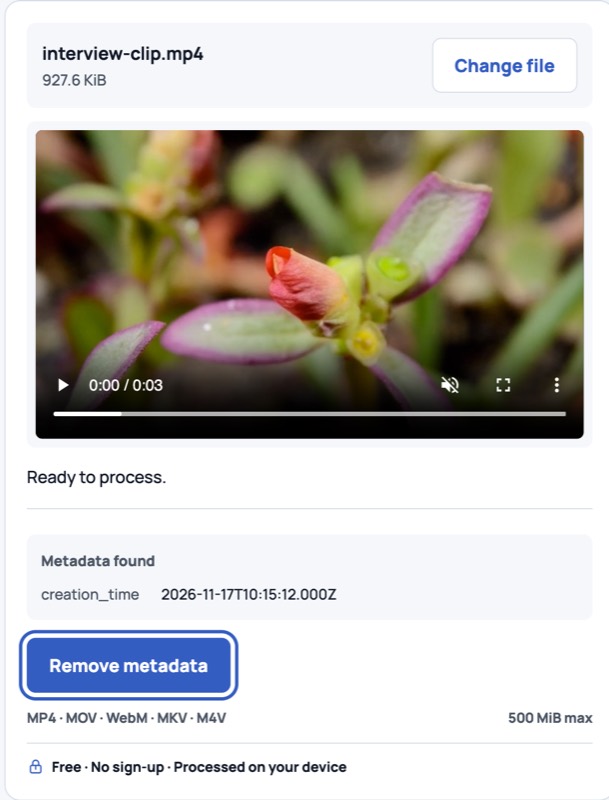
Before anything is exported, the panel lists the tags it detected: creation time, camera make and model, GPS coordinates where present, encoding software and author fields. Seeing the list first is the point — you can decide whether the file needs cleaning before you share it, and you can tell an already-clean clip from one that is not.
What can be removed
Common tags include GPS coordinates, camera make and model, creation time and date, author, editing software and device identifiers. The export is a new file written without those fields, so the cleanup is complete rather than hidden — there is no leftover block that a stricter parser could still read.
What cannot be removed
The picture and sound stay exactly as they are, so landmarks, reflections, signs and voices still identify the place and the people. Some containers also keep technical fields that describe how the video was encoded. Removing metadata reduces what a file says about you; it does not make the content anonymous.
Why video metadata matters
A phone video can record where it was taken, when, and on which device. Sharing it in a group chat or uploading it to a marketplace publishes those details along with the picture. Platforms strip some of it on upload, but email, cloud drives and messaging apps often keep the file intact.
Verify before sharing
After the export, open the file properties in your system file info panel and confirm the location and camera fields are gone. Some players show metadata in a media information window. If you are sending several files, check one from each source, since a camera and a screen recording behave differently.
Keep the original
Removal cannot be undone from the exported copy, and the creation date is often useful later when sorting an archive. Keep the original and share the cleaned version. If a platform rejects the new file for size or format reasons, convert it rather than editing the original again.
Metadata in audio and images
Photos carry EXIF and GPS in a different structure and need the photo metadata remover. Audio files can hold artist, album, title and cover art, which the audio converter drops when it re-encodes. Each file type has its own tool here, so check the one that matches the file in front of you.
Selling and sharing on platforms
Marketplaces, rental listings and public forums often display the file as uploaded. A video that says where it was shot and on which phone can reveal more than the picture intended. Cleaning it before upload is quicker than removing a post afterwards, and it costs one extra file on your device.
Metadata and file size
Removing tags makes a file slightly smaller, but not enough to rescue a video that exceeds an upload limit, because the picture bitrate dominates. Clean first when privacy is the concern; compress or convert when size is. Cleaning takes seconds and does not change how the file plays, so there is no reason to skip it before publishing. For an archive, keep one clean copy and one original rather than overwriting either. Keep both versions until the upload has been accepted, then archive the original. The clean copy is also what you should send to anyone else. Both copies are small; storage is not the constraint.
Common questions
Which metadata is removed?
Container and stream tags including GPS location, EXIF-style camera data, camera or device model, creation time, author and software version.
Can I remove metadata from an MP4?
Yes. Choose an MP4 and save the clean copy; the video and audio streams are copied.
How do I strip GPS location from a video?
The cleaner removes the location tags written by a camera or editor. Review the detected list before exporting.
Can it remove a watermark inside the picture?
No. Only file metadata is removed.