 AudioRemover
DPI Calculator
Enter an image size in pixels to see how large it prints at a given DPI, or enter a print size to see the pixels it needs.
- No upload
Common values: 300 photo prints · 150 posters · 96 screens
Print size
—
Copied
To actually resize an image to these pixels, use Resize Image. To reduce the file size, use Compress Image.
How to use it
- Enter the image width and height in pixels.
- Set the DPI and read the print size in centimetres and inches.
- Or enter a print size to see the pixels it needs.
Formats and limits
Convert image pixels to a print size at any DPI, or work out how many pixels a print needs. The arithmetic runs in your browser.
- Processing
- In your browser, no upload
- Output
- px · cm · in · MP
How the calculation works
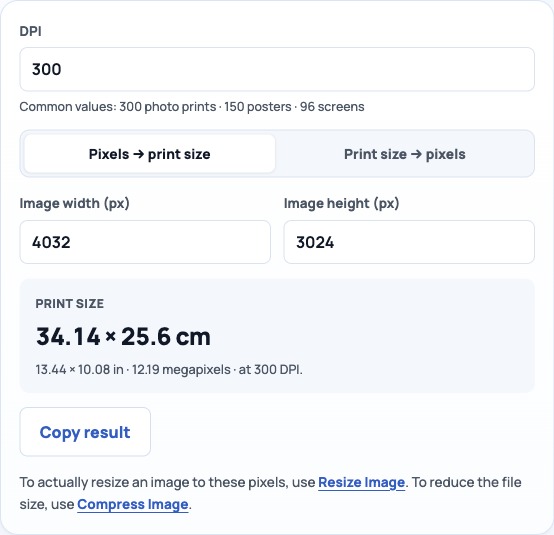
Print size is pixel dimensions divided by DPI. An image 4032 pixels wide at 300 DPI is 4032 ÷ 300 = 13.44 inches, or 34.1 centimetres. Height works the same way: 3024 ÷ 300 = 10.08 inches. Megapixels are width times height divided by one million, so the same photo is about 12.2 megapixels. The inverse direction multiplies a print size by DPI: a 4 × 6 inch print at 300 DPI needs 1200 × 1800 pixels.
Choosing a DPI
300 DPI is the safe default for photo prints, albums and anything a print shop will handle, because it holds up when the print is examined closely. 200 DPI is usually acceptable for larger prints and saves file size. 150 DPI suits posters and banners seen from a metre or more, where the eye cannot resolve individual pixels. 600 DPI matters only for line art, signatures, stamps and tiny type, where hard edges and thin strokes need the extra samples. Viewing distance matters as much as the number: a billboard is printed at a fraction of 300 DPI and still looks sharp from the road.
Common print sizes and their pixels
At 300 DPI a 4 × 6 inch print needs 1200 × 1800 pixels; 5 × 7 needs 1500 × 2100; 8 × 10 needs 2400 × 3000; A4 needs 2480 × 3508; a 2 × 2 inch passport photo needs 600 × 600; and US Letter needs 2550 × 3300. Print shops often crop a millimetre or two on each edge, so leaving a little margin inside the frame is safer than filling it exactly. These numbers are the reason a 12 megapixel photo covers an A4 page at full quality and a 2 megapixel photo covers only a 4 × 6 print.
| Print size | Pixels at 300 DPI | Pixels at 200 DPI |
|---|---|---|
| 4 × 6 in | 1200 × 1800 | 800 × 1200 |
| 5 × 7 in | 1500 × 2100 | 1000 × 1400 |
| 8 × 10 in | 2400 × 3000 | 1600 × 2000 |
| A4 (8.3 × 11.7 in) | 2480 × 3508 | 1654 × 2339 |
| US Letter (8.5 × 11 in) | 2550 × 3300 | 1700 × 2200 |
| Passport (2 × 2 in) | 600 × 600 | 400 × 400 |
What effective DPI means
Effective DPI is the DPI you actually get when a file is printed at a chosen size. If a 1200-pixel-wide image is printed 10 inches wide, the effective resolution is 120 DPI no matter what number is stored in the file. At that level a photo starts to look soft, and text or fine detail visibly breaks up. Conversely, printing a 6000-pixel image at 4 inches gives 1500 effective DPI, which is more than a typical printer can resolve and mostly wastes file size.
DPI metadata is not detail
A JPEG can carry a DPI tag, and some software writes 72 or 300 into it, but the tag does not add or remove a single pixel. Two files with identical pixels and different tags print at the same size through most tools. What actually changes the print is the pixel count and the size you choose when printing. When a store asks for “300 DPI files”, it usually means “enough pixels for the print size”, which is exactly what this calculator works out.
Screenshots and social images
A 1080 × 1350 Instagram image at 300 DPI prints about 9.1 × 11.4 cm, and a 1080 × 1920 story prints 9.1 × 16.3 cm. That is fine for a small photo or a card, but not for a poster. Screenshots are usually 72 or 96 DPI by convention and have the pixels their screen had; enlarging them for print stretches the existing pixels, which softens edges instead of revealing detail. For a large print, start from the original camera file whenever it is still available.
What the calculator does not do
It does not resample, sharpen or upscale an image, and it uploads nothing because no file is needed. It also does not account for printer margins, bleed or the crop a lab applies, so leave a few millimetres of margin when the print is borderless. To change the pixel count itself, use the resize tool; to make the file smaller without changing dimensions, use the compressor. The calculator is the planning step before either of those.
References
Common questions
What does DPI mean?
Dots per inch: how many pixels are placed in every inch of the printed result. An image 3000 pixels wide printed at 300 DPI is 10 inches (25.4 cm) wide. The same file at 150 DPI is 20 inches wide, because fewer pixels are packed into each inch.
Which DPI should I use?
300 for photos and most print shops, 150 for posters and banners seen from a distance, and 600 only for line art, stamps and very small text. Phone screens and computer monitors are measured in pixels, so 72 and 96 are historical defaults rather than requirements.
Does changing DPI change the image?
Not in this calculator, which only does arithmetic. DPI is an instruction stored alongside an image; the pixels themselves stay the same. Some editors change DPI by resampling the picture, which does alter pixels, and that is a resize job rather than a DPI calculation.
How large can I print a phone photo?
A 4032 × 3024 photo from a recent iPhone prints at 34.1 × 25.6 cm (13.4 × 10.1 in) at 300 DPI, roughly A3 size. At 150 DPI the same file reaches 68.3 × 51.2 cm, which is fine for a poster viewed from a metre away.
What size do I need for a 4 × 6 print?
At 300 DPI a 4 × 6 inch print needs 1200 × 1800 pixels, about 2.2 megapixels. Nearly every phone from the last decade clears that easily, so a small print rarely needs any preparation beyond cropping.
Is PPI the same as DPI?
For this calculation, yes. Strictly speaking PPI counts pixels per inch in the file and DPI counts ink dots from the printer, and a printer may use several dots per pixel. The formula that turns pixels into printed inches is the same, so the result is valid either way.